Boost Engagement & Professionalism with Criteria-Based Certificate Issuance
In today’s competitive webinar and online training space, offering certificates of completion isn’t just a bonus; it’s a professional standard. With Flow’s Certificates Version 2.0, you can issue highly customizable certificates based on engagement criteria such as attentiveness, duration, and interactive actions. This powerful feature ensures that only participants who meet your preset engagement standards receive certificates – perfect for continuing education, professional development credits, or compliance requirements.
In this article, we break down how to issue certificates in Flow using advanced criteria, configure templates, and maximize the impact of your certificate delivery.
What is Flow Certificate Version 2.0?
Flow Certificate Version 2.0 is an upgraded module that allows hosts and administrators to generate customized certificates for webinar attendees immediately after a webinar concludes. Unlike simple completion certificates, Version 2.0 lets you:
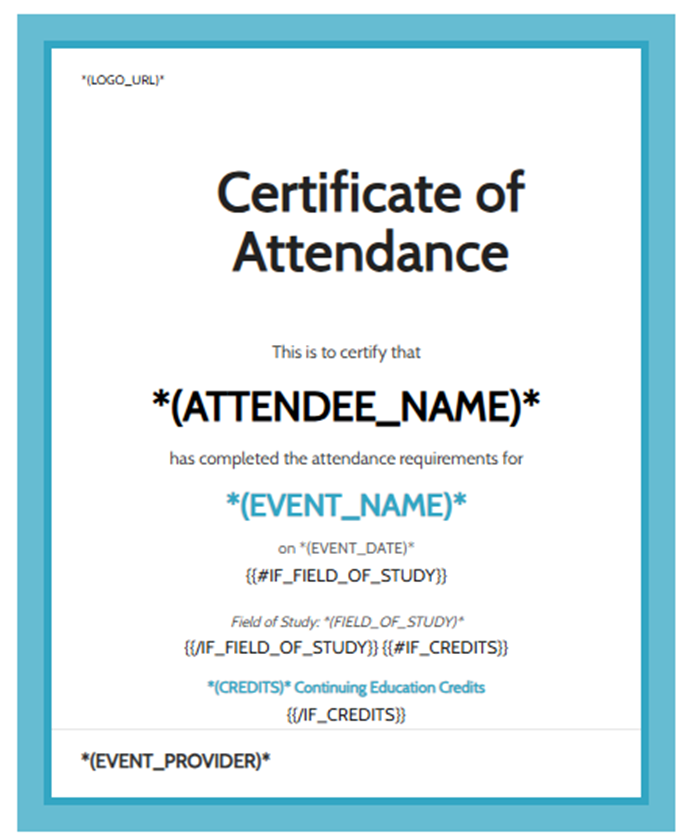
- Create and save certificate templates with visual and code editing.
- Add images, logos, placeholders, and branding.
- Use multiple criteria (alone or combined) to determine eligibility.
- View detailed certificate issuance reports and resend certificates individually.
This feature is ideal for trainers, educators, and corporate webinar hosts who need to issue certificates based on measurable engagement, not just attendance.
Choosing the Right Issuance Criteria
One of the biggest advantages of Flow’s advanced certificate system is the ability to tie certificate issuance to specific engagement metrics. You aren’t limited to “attended or not”; instead, you can require that attendees meet conditions such as:
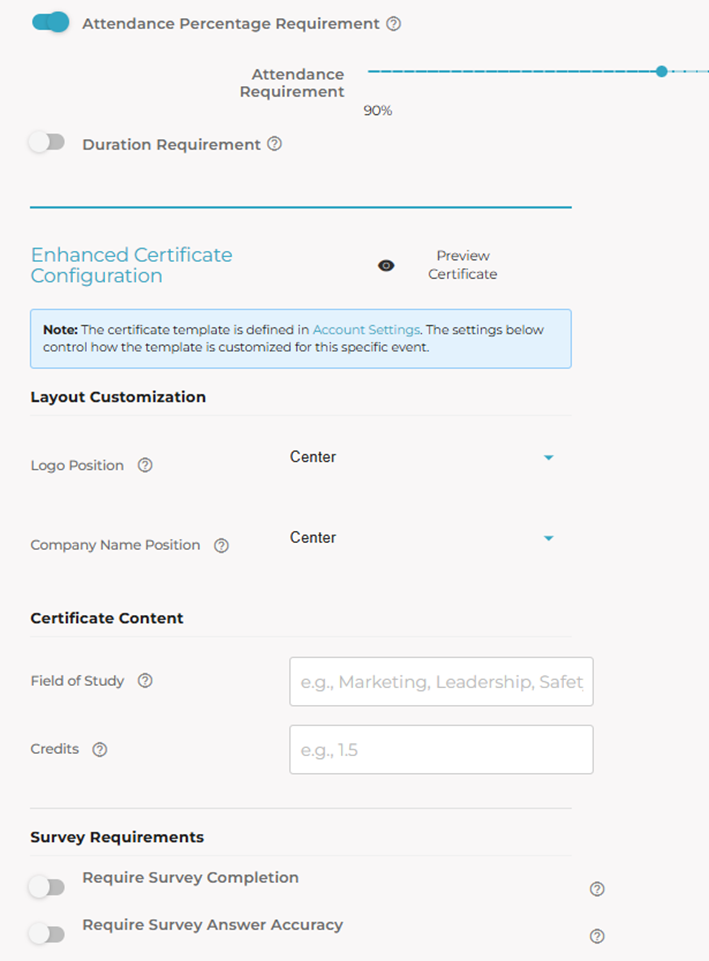
- Attentiveness Percentage: How long the attendee kept the webinar tab active in their browser.
- Duration Threshold: Minimum time spent in the session (e.g., 60 minutes).
- Popup Clicks or Poll Response: Active interaction with engagement popups during the webinar.
- Survey Completion: Require participants to complete one or more surveys, and even enforce answer accuracy.
You can combine these parameters using AND/OR logic to design complex criteria that match your educational or compliance goals.
Step‑by‑Step: Set Up Your Certificate Template
Before issuing certificates in any webinar event, you need a certificate template. Here’s how to set it up. After the webinar concludes, Flow automatically matches participant engagement data against your criteria and issues certificates to eligible attendees.
Pro Tip: While there’s no drag-and-drop builder yet, using CSS/HTML gives you full control over layout and styling.
Reporting & Manual Management
Flow doesn’t stop at issuance. It also gives you visibility and control:
- Certificate Reports: See who received certificates and view engagement metrics.
- Manual Sends: If someone missed their certificate, you can resend it from the reports page.
- CSV Export: Download detailed participation logs for audit or compliance purposes.
- Pro Tip: These tools are especially useful for organizations that need logs for continuing education credits or corporate training validation.
Why Advanced Certificate Automation Matters
Issuing engagement-based certificates with Flow offers tangible benefits:
- Increases attendee engagement. When participants know they must meet criteria, they’re likelier to stay attentive and interact.
- Provides professional credentials. Certificates reflect real effort rather than passive attendance.
- Supports compliance and reporting. Automatically logs eligibility criteria linked to issuance.
- Enhances brand credibility. Fully branded certificates make your webinars feel polished and professional.
Best Practices for Certificate Issuance
To get the most out of Flow’s certification feature:
- Align criteria with your learning objectives — don’t make thresholds too low or unrealistically high.
- Use visually appealing templates that reinforce your brand.
- Test issuance settings in a demo event before going live.
- Provide clear instructions to attendees about qualification requirements.
Flow Certificate Pricing
To choose the plan that works for you:
- Free Plan: Issue up to 1,000 certificates per month — forever. Perfect for small webinars or trial sessions.
- Professional Plan: $19.90/month for 10000 certificates. Ideal for busy trainers, large classes, or recurring webinars. Need more? Let’s talk (click here)
- All Features Included: Automated issuance, attendance verification, engagement tracking, and branded certificates.
- Flexible & Affordable: Scale effortlessly as your webinars and participant numbers grow.
Final Thoughts
Flow’s advanced certificate issuance empowers you to offer professional, automated certificates that reflect real attendee engagement. Whether you’re hosting educational webinars, compliance training, or professional development series, Certificate Version 2.0 brings flexibility, precision, and a refined experience to your audience.
Start customizing your certificate template today and turn every webinar into a recognized learning milestone.